Physical Address
304 North Cardinal St.
Dorchester Center, MA 02124
Physical Address
304 North Cardinal St.
Dorchester Center, MA 02124

Several iPhone users are reporting a frustrating problem after updating to iOS 27: contacts are getting blocked automatically without any action from the user.
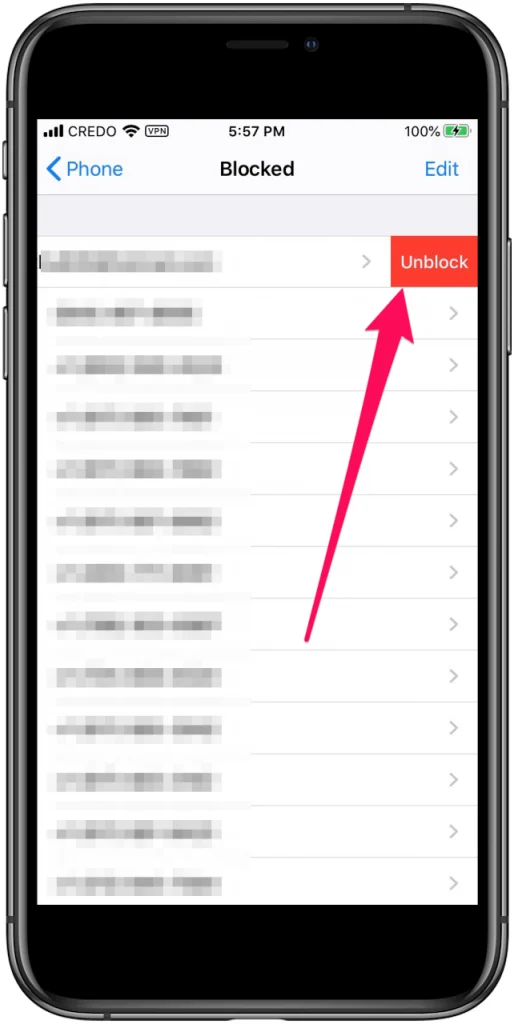
What makes this issue particularly concerning is that it is not necessarily affecting unknown or unwanted numbers. Some users report that their iPhones are automatically blocking people they communicate with regularly, including family members, friends and even delivery personnel.
In some cases, users manually unblock the affected contact, only to find that the same contact gets blocked again automatically.
The problem has also reportedly continued after upgrading to a completely new iPhone, raising questions about whether the issue is related to iCloud contact syncing, iOS settings or a software bug.
One affected iPhone user described the problem:
“This is happening to me too and it is a contact I communicate with multiple times a week if not daily. I even got a new phone (because it was time) and it is happening. Please help if any of you have figured it out.”
This experience raises an important question: Why would an iPhone automatically block a contact that the owner regularly communicates with?
The fact that the issue reportedly continued even after purchasing a new phone suggests that replacing the hardware may not necessarily solve the problem.
If the issue is associated with an iCloud account, synced settings or an iOS software problem, it could potentially follow the user to their new device.
Another user expressed frustration about the same issue:
“It happens to me too. It’s v. annoying & damaging! It’s not acceptable! And it’s getting worse. We believe Apple uses lousy technicians who ruin the system.”
Although this is an individual user’s opinion, it highlights how disruptive unexpected contact blocking can become.
Blocking a contact is supposed to be a deliberate privacy feature. When it happens without the owner’s permission, it can interfere with everyday communication.
The consequences may include:
For users who depend on their iPhones for work, personal communication and deliveries, this can become a serious inconvenience.
Perhaps the most concerning experience comes from a user who was expecting a delivery.
The user reported:
“I’m having the same issue and it’s for a delivery that I’m expecting. I went through and tried manually unblocking and I literally watched it re-block the contact by itself.”
This is particularly frustrating because manually unblocking the number does not appear to provide a permanent solution.
If the contact gets blocked again immediately, there may be an underlying issue with the phone’s settings, account synchronisation or software.
However, it is important to establish whether the number is actually being added to the blocked contacts list or whether an unknown-caller filtering feature is simply preventing the call from appearing normally.
Apple has not established a confirmed cause for these specific user reports. However, several settings and possible software-related explanations are worth investigating.
If you use multiple Apple devices with the same Apple Account, contact-related settings and data may be synchronised.
An issue involving account synchronisation could potentially explain why a contact-blocking problem persists after moving to a new iPhone.
Check whether the same contact appears blocked on another Apple device.
iOS includes features that help manage calls from unknown numbers.
Depending on your settings, calls may be silenced, screened or filtered.
Go to:
Settings > Apps > Phone
Review the available call filtering, screening and unknown-caller options.
Remember that silencing an unknown caller is not the same as adding that number to your blocked contacts list.
Applications designed to identify spam calls or block unwanted numbers can influence how incoming calls are handled.
If you use applications such as Truecaller or other call-identification services, temporarily disable their call identification and blocking permissions to check whether the behaviour changes.
Another possibility is a software-related issue introduced in an iOS update.
If contacts are repeatedly added to the blocked list without user interaction, Apple should investigate whether an underlying iOS issue is responsible.
Updating to the latest stable iOS version may help if Apple has released a relevant fix.
If your iPhone is automatically blocking contacts, try the following troubleshooting steps.
Open:
Settings > Apps > Phone > Blocked Contacts
On some iOS versions, the option may appear under Settings > Privacy & Security or the Phone settings directly.
Check whether the affected number appears in the list.
If it does, unblock the contact and observe whether it gets blocked again.
If you own an iPad, Mac or another iPhone connected to the same Apple Account, check its blocked contacts and communication settings.
Look for any unexpected blocking behaviour across devices.
Go to:
Settings > Apps > Phone > Call Blocking & Identification
Temporarily disable third-party call identification and blocking services.
Check whether the problem continues.
Go to:
Settings > General > Software Update
Install any newer stable update available for your iPhone.
Before updating, make sure you have a recent backup.
If the same contact keeps getting blocked after manually unblocking it, contact Apple Support.
Provide the following information:
If possible, record a screen video showing the contact being unblocked and subsequently appearing in the blocked list again.
This could help Apple identify the underlying cause.
Not necessarily.
One user specifically reported that the problem continued even after purchasing a new iPhone.
This is an important observation because it suggests that the issue may not be limited to a particular handset.
If the problem is associated with an Apple Account, restored device settings or synchronised data, it could potentially reappear after setting up a replacement iPhone.
For this reason, buying another iPhone should not be considered a guaranteed solution.
Automatically blocking frequently contacted people is not normal behaviour for a smartphone.
The reports are particularly concerning because some users claim that manually unblocking a contact does not solve the issue.
The problem can cause missed deliveries, interrupted conversations and unnecessary confusion.
Apple should investigate whether iOS 27 has introduced a bug affecting blocked contact lists, account synchronisation or call-filtering settings.
Until a confirmed fix is available, affected users should document the behaviour and report it through Apple Support.
Have you noticed your iPhone automatically blocking contacts after updating to iOS 27?
We would like to hear about your experience.
Share your experience in the comments. Your feedback may help other iPhone users identify whether they are experiencing the same problem.