Physical Address
304 North Cardinal St.
Dorchester Center, MA 02124
Physical Address
304 North Cardinal St.
Dorchester Center, MA 02124

Buying a premium smartphone is a significant investment. When you spend a considerable amount on a brand-new iPhone, you naturally expect its finish to remain in excellent condition, at least during the first few weeks of use.
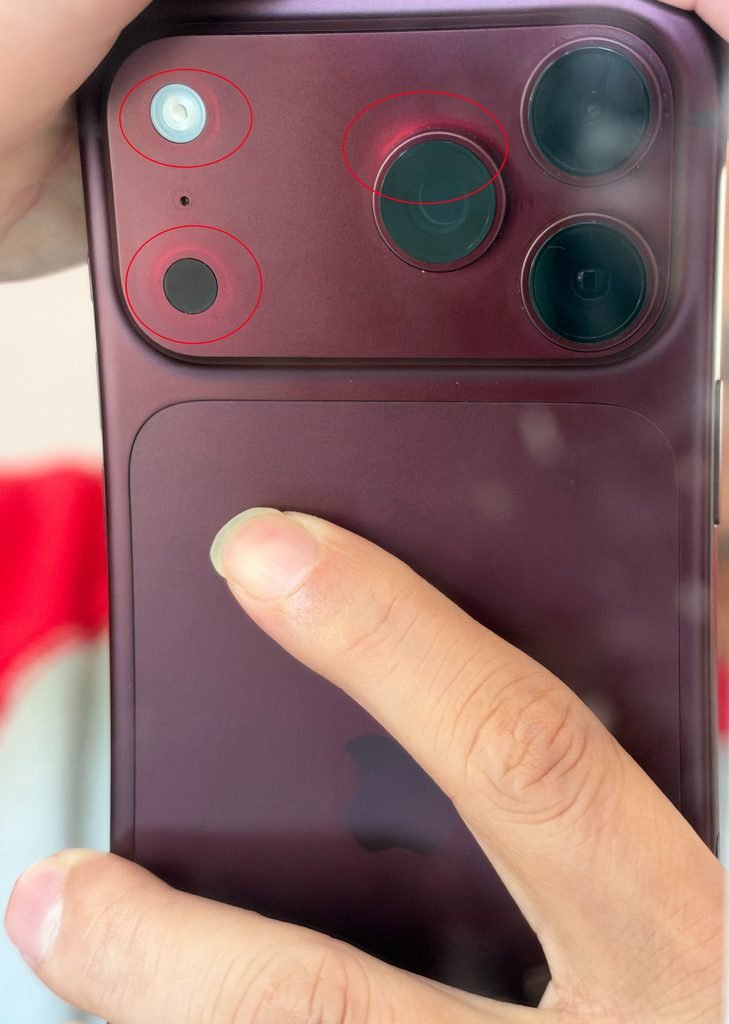
However, an unusual cosmetic issue has caught the attention of some iPhone 18 Pro Max owners. Users have reported discoloration around the camera lenses, marks near the camera bump, and circular marks on the aluminium frame.
The concern is particularly frustrating for owners of the Burgundy colour variant, who expected the phone’s premium finish to last.
Some owners have reported unusual changes in the appearance of their new iPhone 18 Pro Max.
The reported problems include:
One owner reported noticing these marks even though the phone was relatively new.
The issue raises questions about the durability of the aluminium finish and whether the discoloration is caused by normal wear, surface damage, or a potential manufacturing defect.
Another iPhone 18 Pro Max owner reported experiencing a similar problem with their Burgundy device.
According to their experience, discoloration appeared around the camera lenses and camera bump. They also expressed concern that the aluminium body seemed particularly sensitive to scratches.
The owner suggested using a protective case to reduce the possibility of cosmetic damage.
However, it is important to distinguish between ordinary scratches, surface discoloration, and manufacturing defects. These issues may have different causes and require different solutions.
One particularly useful experience shared by an affected owner involves contacting Apple Support directly.
According to the owner, Apple provided the following procedure:
If Apple confirms a manufacturing defect, the owner reported being offered a replacement device.
According to the shared customer experience, Apple offered a replacement after assessing the submitted photographs.
The reported replacement process involved:
These details describe one customer’s experience and should not be treated as a guaranteed replacement policy for every discoloration complaint.
Apple will assess each case according to its applicable warranty and service conditions. Replacement eligibility, delivery time and any temporary charge may vary.
If you notice unusual marks or discoloration on your new iPhone, consider taking these steps:
1. Document the problem
Take clear photographs of the affected camera rings, camera bump and aluminium frame.
2. Contact Apple Support
Explain when you purchased the phone and when you first noticed the discoloration.
3. Request a cosmetic inspection
Ask Apple to assess whether the marks are normal surface wear or a potential manufacturing defect.
4. Avoid attempting to clean or polish the affected area aggressively
Do not use abrasive materials or chemical cleaners, as they may cause additional damage.
5. Keep your purchase invoice
Your original purchase invoice will help establish the purchase date and warranty eligibility.
Discoloration on a premium smartphone within the first few weeks of ownership is understandably frustrating.
The experiences shared by affected Burgundy iPhone 18 Pro Max owners raise questions about the durability of the aluminium finish, particularly around the camera assembly.
The reported Apple Support process offers a practical first step: submit clear photographs and request an assessment rather than assuming that the problem is normal wear or immediately paying for a repair.
If you own a Burgundy iPhone 18 Pro Max, have you noticed discoloration around the camera lenses or marks on the aluminium frame?
Share your experience in the comments. Your feedback may help other owners understand whether they are experiencing a similar issue.