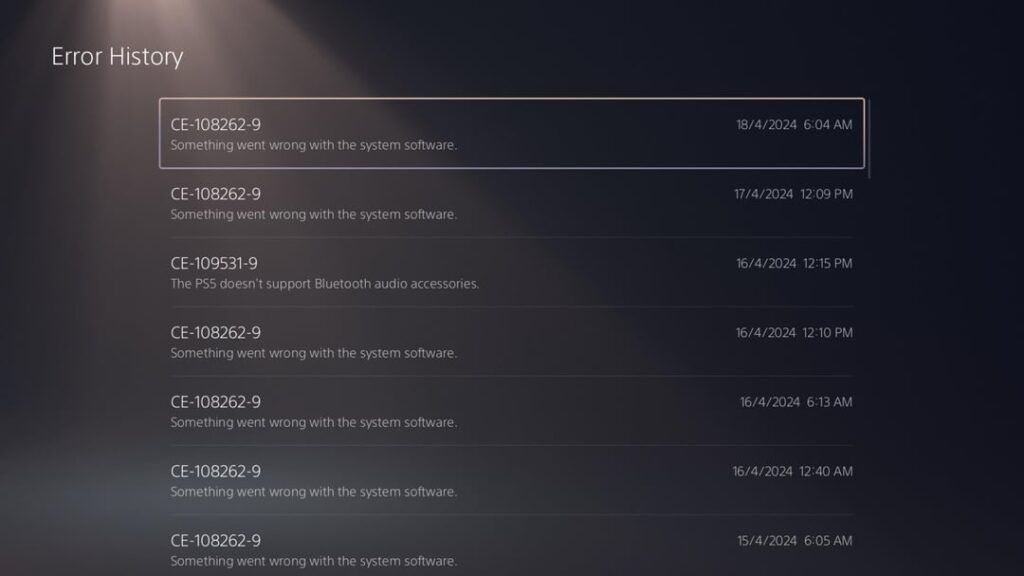
Many owners of the PlayStation 5 are encountering the frustrating system error, which does not let them play : The error code shown is :
CE-108262-9
This error often appears:
- while waking the PS5 from Rest Mode,
- during startup,
- or immediately after booting.
In many cases:
- the console works perfectly during gameplay,
- temperatures are normal,
- and crashes only happen during startup from Rest Mode.
Here’s what causes the error and the fixes that actually worked for users.
What Is PS5 Error CE-108262-9?
Error code:
CE-108262-9
usually indicates:
- corrupted system data,
- damaged application files,
- storage corruption,
- or communication problems with connected devices.
Some users specifically noticed the crash referencing:
NPXS45092
which appears related to PS5 system software processes.
Common Symptoms
Users experiencing CE-108262-9 report:
- crashes only when waking from Rest Mode,
- no crashes during gameplay,
- system stability while gaming,
- repeated startup error messages,
- and random system software crashes.
In many cases:
- booting from full shutdown works normally,
- but Rest Mode consistently triggers the error.
Why PS5 Crashes From Rest Mode
Several users discovered the issue was not actually:
- overheating,
- GPU failure,
- or hardware damage.
Instead, the problem was caused by:
- corrupted external storage,
- damaged PS4 game data,
- Rest Mode conflicts,
- or HDMI communication issues.
How to Fix PS5 Error CE-108262-9
Below are the most effective solutions users found.
Fix 1: Disconnect External USB Storage
One of the most successful fixes involved unplugging an external USB SSD or HDD.
Users storing PS4 games externally discovered:
- the external drive was corrupted,
- and disconnecting it immediately stopped the crashes.
Test This:
- Fully power off PS5
- Disconnect external USB drive
- Restart console
- Test Rest Mode again
If the error disappears:
- the external drive is likely corrupted.
Fix 2: Reformat the External SSD or HDD
Several users permanently fixed CE-108262-9 by:
- reformatting the external drive,
- reinstalling PS4 games,
- and rebuilding save interactions.
Steps:
- Backup important files
- Reformat external storage through PS5 settings
- Reinstall PS4 games
- Launch each game once
This appeared to refresh corrupted storage or metadata issues.
How to Fix PS5 Error CE-108262-9 After Rest Mode Crash
Many users reported:
- crashes only occur after Rest Mode,
- but never during gameplay.
That strongly suggests:
- corrupted wake-state data,
- storage mounting issues,
- or resume-state conflicts.
External storage devices appear to be one of the biggest triggers.
Fix 4: Disable HDMI Link
Another surprisingly effective fix was disabling HDMI Device Link.
Steps:
- Open:
- Turn OFF:
Some users reported:
- the error disappeared permanently afterward.
This may help if HDMI communication conflicts occur during wake-up from Rest Mode.
Fix 5: Rebuild Database and Clear Cache
While not always a permanent fix, many users tried:
Safe Mode Options:
- Rebuild Database
- Clear System Cache
- Restore Licenses
These can help repair:
- corrupted indexes,
- damaged cached data,
- or licensing conflicts.
Fix 6: Reinstall PS5 System Software
Some users attempted:
- system software reinstall through internet,
- or USB recovery installation.
Methods:
- Safe Mode reinstall
- USB firmware reinstall
However, for many users:
- the issue persisted until external storage was fixed.
Fix 7: Avoid Rest Mode Temporarily
If the issue continues:
- fully shutting down the PS5 instead of using Rest Mode may prevent crashes.
Many users confirmed:
- cold boot works perfectly,
- while Rest Mode consistently triggers CE-108262-9.
Why External PS4 Storage Causes Problems
Many PS5 owners store:
- PS4 games,
- saves,
- or media
on external SSDs or HDDs.
If the drive becomes corrupted:
- Rest Mode wake-up may fail,
- storage mounting can break,
- and system software crashes may occur.
Reformatting often resolves hidden file system corruption.
Is It a Hardware Problem?
In most reported cases:
- gameplay remained stable,
- temperatures were normal,
- and no GPU artifacts or shutdowns occurred.
That suggests:
- the issue is usually software or storage-related,
- not a failing console.
Final Thoughts
PS5 Error CE-108262-9 is commonly linked to:
- corrupted external USB storage,
- Rest Mode conflicts,
- damaged system data,
- or HDMI communication issues.
The most successful fixes currently are:
- disconnecting and reformatting external SSDs,
- reinstalling PS4 games,
- disabling HDMI Link,
- and avoiding Rest Mode temporarily.


