Physical Address
304 North Cardinal St.
Dorchester Center, MA 02124
Physical Address
304 North Cardinal St.
Dorchester Center, MA 02124

If you’re trying to use an AI feature in Google Sheets and you see the message “AI function not available”, you’re not alone. This error has become increasingly common as Google rolls out AI-powered tools across its workspace ecosystem.
In this guide, we’ll explain why this message appears, what it actually means, and how you can fix it.
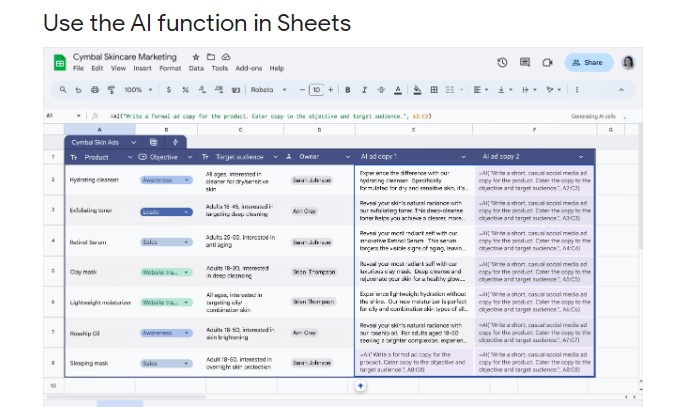
The message typically appears when:
=AI() or smart assist features)In most cases, it’s not a technical error — it’s an access limitation.
Google’s AI features in Sheets are part of paid plans such as:
If you’re using:
You may not have access to AI functions.
For more details, read this Google Page
Even if your organization has access, AI features must be enabled by the admin.
If you’re using a company or school email, ask your admin to:
Google often releases AI features gradually.
Possible rollout limitations:
If your colleague has it but you don’t, this may be the reason.
Some users try entering unofficial AI formulas such as:
=AI("Summarize this data")
If your account doesn’t officially support this function, Sheets will return “AI function not available.”
Google Sheets does not currently support a public universal AI formula for all users.
Occasionally, browser extensions interfere with AI features.
Try:
Some accounts have limitations:
In these cases, AI may be intentionally disabled.
Go to:
Google Account → Subscriptions
Confirm whether you have:
If not, upgrade may be required.
If using a company email:
Instead of typing formulas manually:
If you don’t see these options, your account likely does not have AI enabled.
Log in with:
This helps confirm whether the issue is account-specific.
If you cannot access AI inside Google Sheets, you can:
Some AI tools integrate with Sheets through add-ons, but availability varies.
AI features cost significant computing resources. For that reason:
This is not a bug in most cases — it’s an access issue.
If Google Sheets says “AI function not available,” it usually means:
